

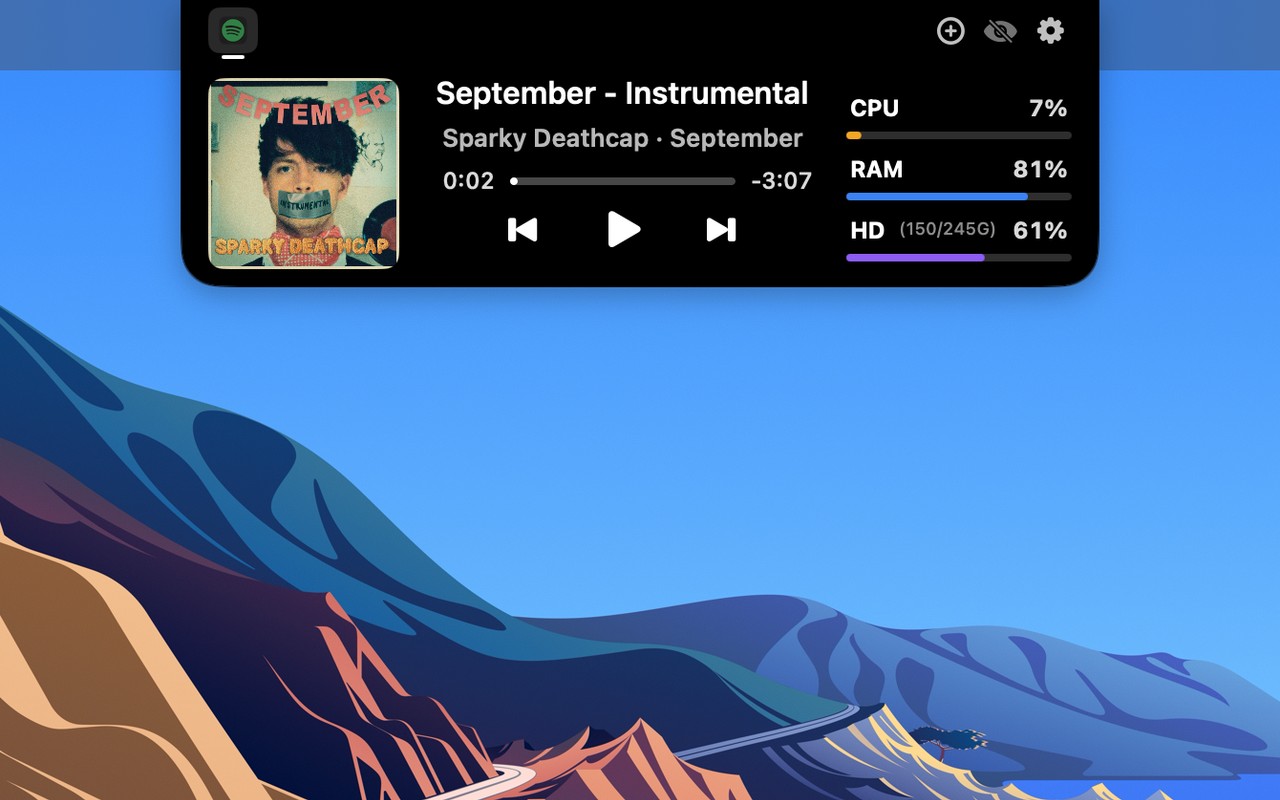
A tiny Mac app that turns the MacBook notch into a music player. See what is playing, pause, skip and seek without leaving your work.
While a song plays, a small pill hugs the notch. Rest the mouse on it and the player opens: artwork, the song, a timeline you can drag and the buttons you need. Move away and it tucks back. Free for good with Spotify.
What you get
Lives in the notch
Rest the mouse on the notch and the player opens. Move away and it tucks back.
Play, pause, skip, seek
Artwork, the song, a timeline you can drag and the three buttons you need.
CPU, RAM and disk at a glance
A small live column beside the player. Free.
Spotify, free for good
Works with the Spotify app and with Spotify's web player in your browser. No account needed.
Premium: every other player
YouTube and other browser tabs, Apple Music, VLC and anything else that plays show as locked tabs until you unlock them. Also your own apps beside the player and the Liquid glass look.
Private
What you play never leaves your Mac.
Colour-accurate, not just flipped
of the solid colour in a document (pictures, highlights, shading, shapes) is shown in dark mode exactly as it is in light mode. A generic dark mode flips every colour, so a blue picture turns orange and a yellow highlight turns dull. This one never touches pictures and repaints colours one by one. Thin coloured text is lightened on purpose so it can be read on a dark page.
Measured on 2026-11-05 on real documents, in a real browser. How we measured it
Questions
What is free and what is Premium?
How do I get Premium?
My Mac says it cannot check the app. Is it safe?
Why does it ask to control Spotify?
Which Macs does it work on?
Is this made by Spotify or Apple?
Pricing
Free for good: Spotify (the app and the web player) and the CPU, RAM and disk column. No account needed.
Independent app, not affiliated with Spotify, Apple or Google. Spotify, YouTube, Mac and macOS are trademarks of their owners.